
Disclosure: This post contains an affiliate link for Zoho Customer Portal. If you make a purchase or sign up through these links, I may earn a small commission at no extra cost to you. Getting started with Zoho Customer Portal is a great way to manage your business, and you can get $100 in Zoho wallet credits to kickstart your account when you sign up through my referral link!
Introduction
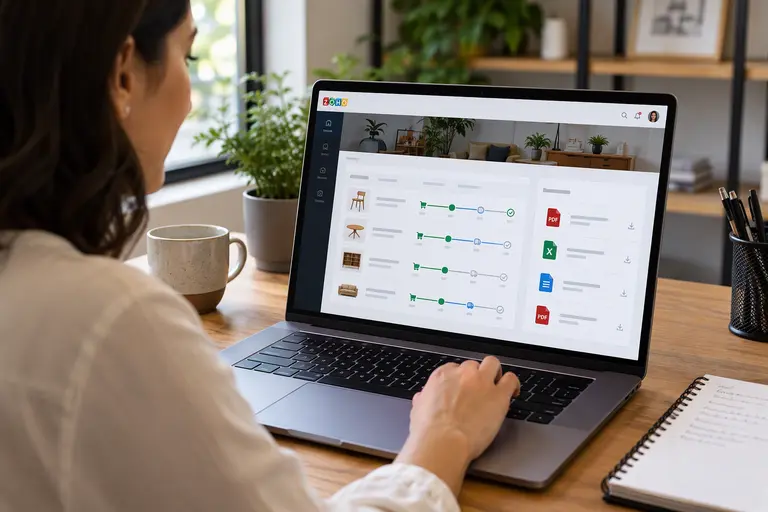
Customers no longer want to call a shop repeatedly just to ask about an order status. Instead, they expect quick, reliable answers online. Fortunately, even a small jewellery shop, gemstone dealer, watch retailer, or travel agency can meet this expectation by building a professional customer portal. A portal works like a private digital window into your business. First, customers log in using secure credentials. Then, they check active orders, view invoices, submit requests, and track project progress. Meanwhile, your internal team manages everything from familiar, integrated business applications. For example, imagine you buy a sapphire from a local dealer; rather than phoning about dispatch, you log in, read the stone details, open the laboratory report, and check delivery status. Zoho makes this service possible. Moreover, its suite of applications works seamlessly together when you configure them correctly. For background, read our guide to buying certified gemstones.
Choosing the Right Zoho Customer Portal Application
You do not need an expensive custom-built portal on day one. Therefore, you should learn what each application does, and then pick an affordable starting point that solves your biggest bottleneck.
Using Zoho Creator for a Custom Customer Portal
Zoho Creator is a low-code platform that lets you build forms, reports, dashboards, and custom customer pages. For instance, a gemstone dealer can build a private inventory portal where approved manufacturers browse stones, request quotations, and check memo status. Similarly, a jewellery designer can give clients a space to review design sketches and approve production stages. However, specialised features require proper workflows, permission settings, and occasionally custom scripting.
Managing Relationships via a Zoho Customer Portal
Zoho CRM stores all customer details, enquiries, and sales records. Its portals give customers-controlled access to selected records. For example, a watch retailer can let registered customers view permitted product details or repair logs. Consequently, staff manage customer relationships without exposing the entire internal database to the public.
Payments and Invoices in Your Zoho Customer Portal
Zoho Books lets buyers view invoices, accept quotations, pay online, download receipts, leave comments, and upload documents. For example, a jewellery retailer sends a quotation for a gold necklace, and the customer accepts it and pays through a connected gateway. Meanwhile, Zoho Billing serves subscription-based businesses, where customers view their plans and billing history.
Providing Support Through a Zoho Customer Portal
Zoho Desk offers a Help Center where registered users raise requests, track progress, and read knowledge-based articles. For example, a customer who sends a mechanical watch for servicing can follow the request progress online. As a result, the service centre receives organised enquiries instead of scattered, frustrating messages.
Real Businesses Using a Zoho Customer Portal
Jewellery Retailers and Designers
Imagine you order a custom engagement ring. The retailer’s portal shows the approved design, the current delivery date, and the final invoice. Furthermore, it stores gemstone grading documents and sends automated reminders for annual cleaning and warranty services. Designers gain even more, because they gather sketches, CAD renderings, and material specifications in one place. Consequently, customers confirm changes before production begins, and misunderstandings drop significantly. Also, see our jewellery care guide.
Gemstone Dealers and Laboratories
A dealer who supplies sapphires, rubies, and emeralds can build a restricted business-to-business portal in Zoho Creator. Approved buyers filter stones by weight, colour, and price, request quotations, and open uploaded laboratory reports. In addition, the dealer records memo transactions and return dates. However, these features need well-designed inventory records and automated workflows, as they do not appear automatically. Likewise, a testing laboratory can let customers register stones and follow testing stages.
Watch Retailers and Travel Businesses
A watch retailer can keep purchase, warranty, and servicing records online. A collector submits a watch, follows the repair, and approves estimates before extra work begins. Similarly, a small travel agency can share itineraries, vouchers, and payment details. However, live flight data and hotel availability need external integrations, since Zoho does not provide every travel service by default. Read our travel planning tips as well.
Primary Advantages of a Zoho Customer Portal
First, portals reduce administrative work. Customers retrieve invoices and check progress themselves, so employees answer fewer routine phone calls. Moreover, a central portal keeps records and conversations organised, and customers access them at any hour. Additionally, integrated applications move data between customer records, accounting, and service workflows, which cuts duplicate data entry. Finally, permissions let you control access, so each dealer sees only the appropriate inventory.
Practical Challenges for Your Zoho Customer Portal
Costs deserve attention. Simple portals need little development, but specialised workflows may require professional help. Furthermore, your subscription and add-ons determine how many external users you can add, so calculate the total cost before you invite hundreds of customers. Adoption also matters. Many established buyers prefer telephone calls or instant messaging. Therefore, keep traditional channels open. In addition, a business portal does not replace a professional website, and encryption does not guarantee total security. Consequently, configure permissions and data retention carefully.
How to Launch Your Zoho Customer Portal
Solve one customer problem first. For example, a neighbourhood jeweller can start with Zoho Books for quotations and invoices and later add Zoho Creator for custom orders and repair tracking. First, identify what customers need. Next, choose the right application. Then, set permissions and test the portal with a few loyal customers. Finally, collect feedback before you expand. Ultimately, technology should make everyday transactions easier, clearer, and more convenient for everyone.
Frequently Asked Questions
Can a small jewellery shop afford a Zoho customer portal?
Yes. A small shop can begin with the Zoho Books portal and add custom features later. Cost depends on your subscription and user requirements.
Can gemstone dealers restrict inventory access?
Yes. Zoho Creator supports customised permissions, so dealers can show each authorised buyer only the appropriate records.
Can customers download GIA or IGI reports?
Yes. You can upload laboratory reports and give authorised customers access through configured document storage.
Does every customer need to use the portal?
No. Businesses can keep serving customers through visits and calls. Instead, a portal should add convenience rather than block personal service.
Disclaimer
This article provides general information. Features, licensing, and security practices vary by plan. Verify requirements with Zoho before implementation.